Redesigning a Government Information Portal
A redesign of a government information portal that transforms a dense, hard-to-navigate website into a clearer, more structured, and more trustworthy public experience.
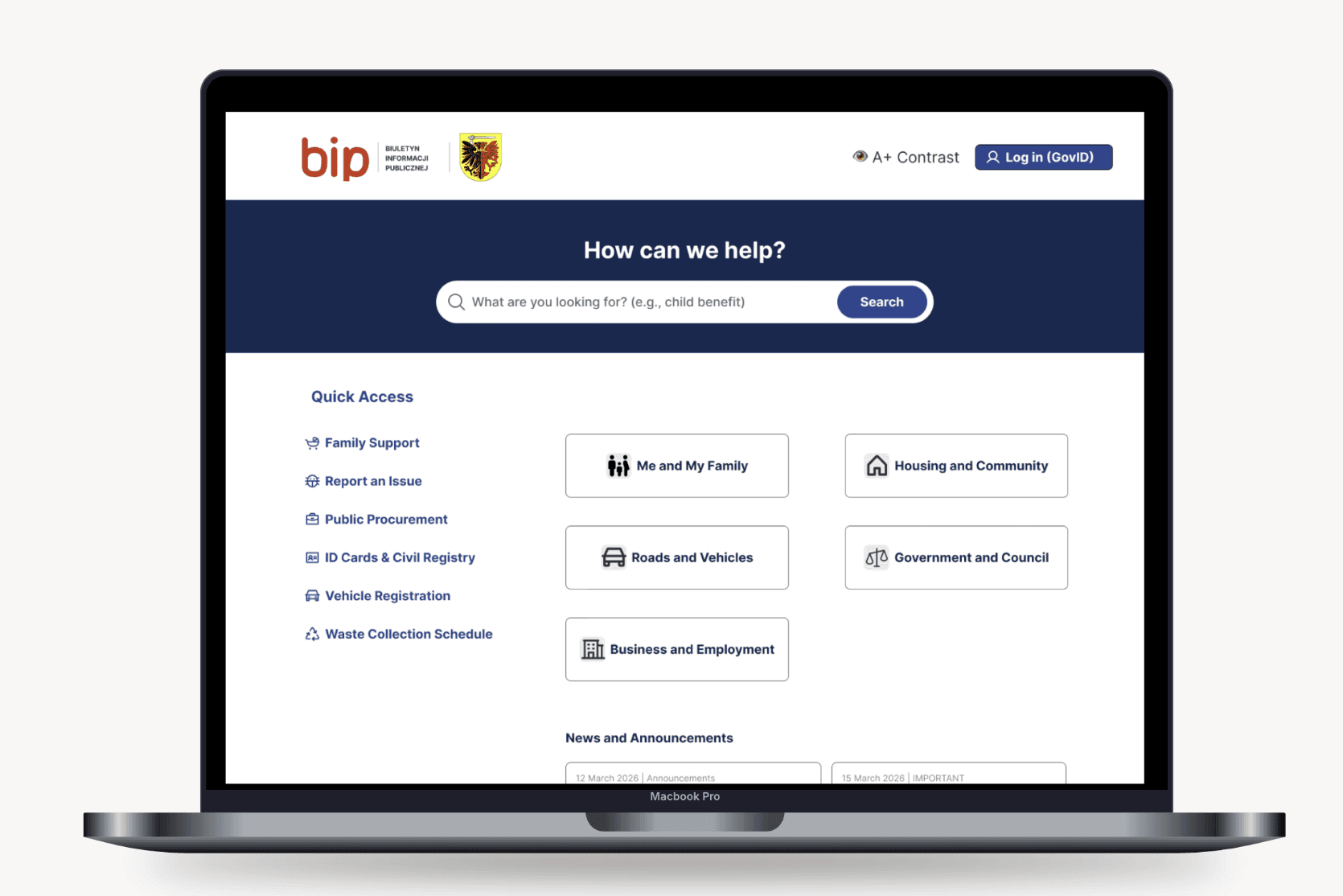

Overview
BIP Tuchola is a redesign of a public information website created to improve access to municipal content. The project focused on making the experience easier to scan, easier to navigate, and more supportive of task-based use, especially for people who visit the site to complete a specific action quickly.
Rather than treating the redesign as a visual refresh, the work focused on structure, hierarchy, and trust. The goal was to create a calmer and more predictable experience while preserving the seriousness and credibility expected from a government service.
Role: UX / UI Design
Scope: End-to-end redesign of a public government information website, focused on information architecture, navigation, visual hierarchy, usability testing, and final UI design.
Goal: Simplify a dense municipal website into a clear, well-structured experience that helps users find important information quickly without losing credibility or purpose.
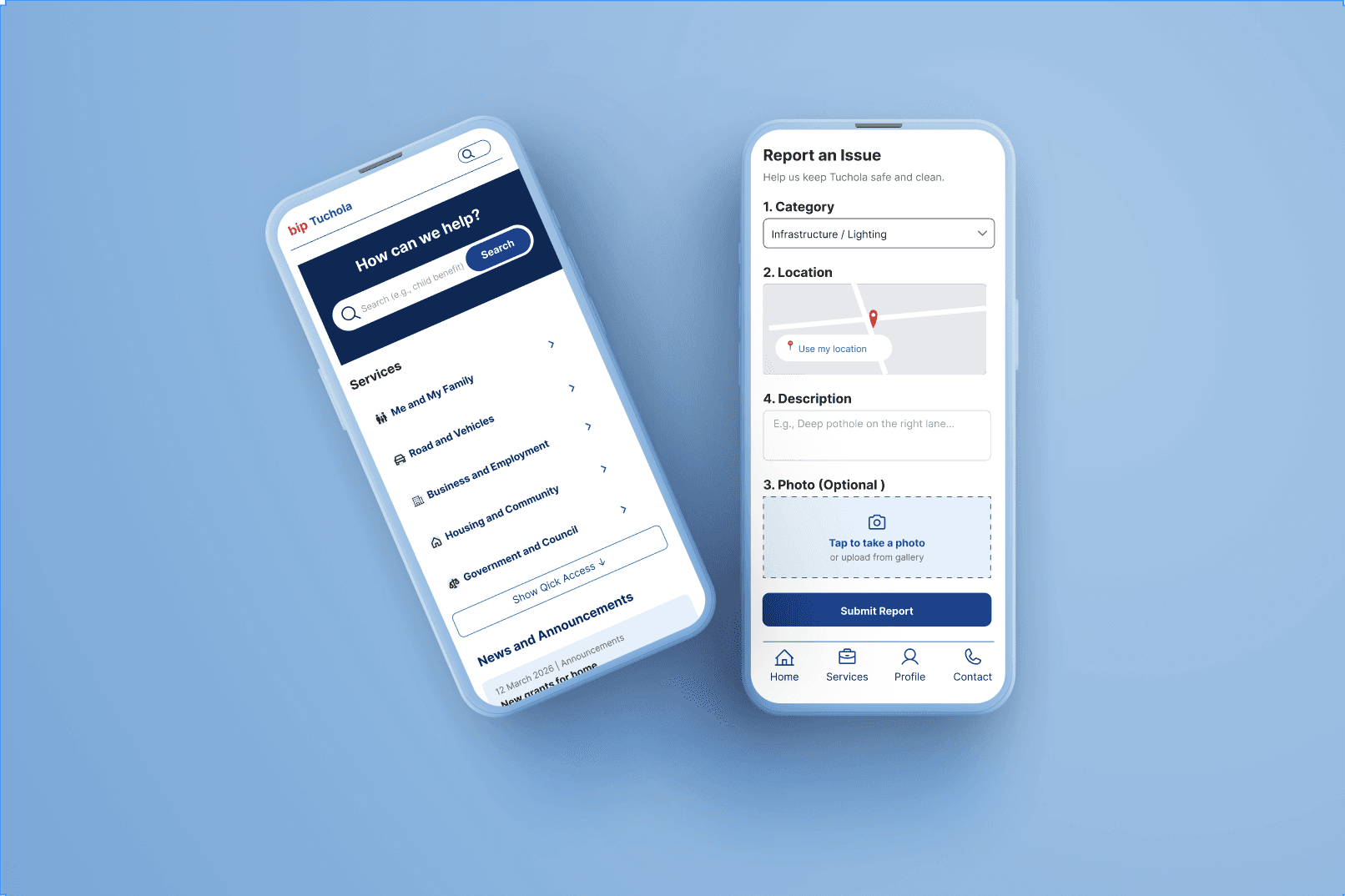
Outcome: Two rounds of usability testing revealed the need for stronger hierarchy, better mobile responsiveness, clearer forms, and improved accessibility, leading to a redesign with more prominent search, a streamlined step-by-step flow, and a single-column responsive layout.
The Problem
The original website contained useful information, but the experience did not support quick access to it. Important content was harder to find than it should have been, and the page hierarchy did not clearly guide users through the interface.
For a public information website, that creates friction very quickly. People usually arrive with a specific task in mind, so the interface needs to help them orient themselves fast and move efficiently through the content.


Research
To understand where the problems were coming from, the redesign began with a review of the existing site structure and its main usability issues. The analysis focused on how content was grouped, how navigation either supported or slowed down the experience, and where the visual hierarchy made scanning harder than necessary.
The audit showed that the site needed stronger structure, clearer grouping, and more deliberate prioritization. Instead of making the interface more decorative, the direction focused on making it easier to read, easier to navigate, and more predictable.
Affinity Mapping
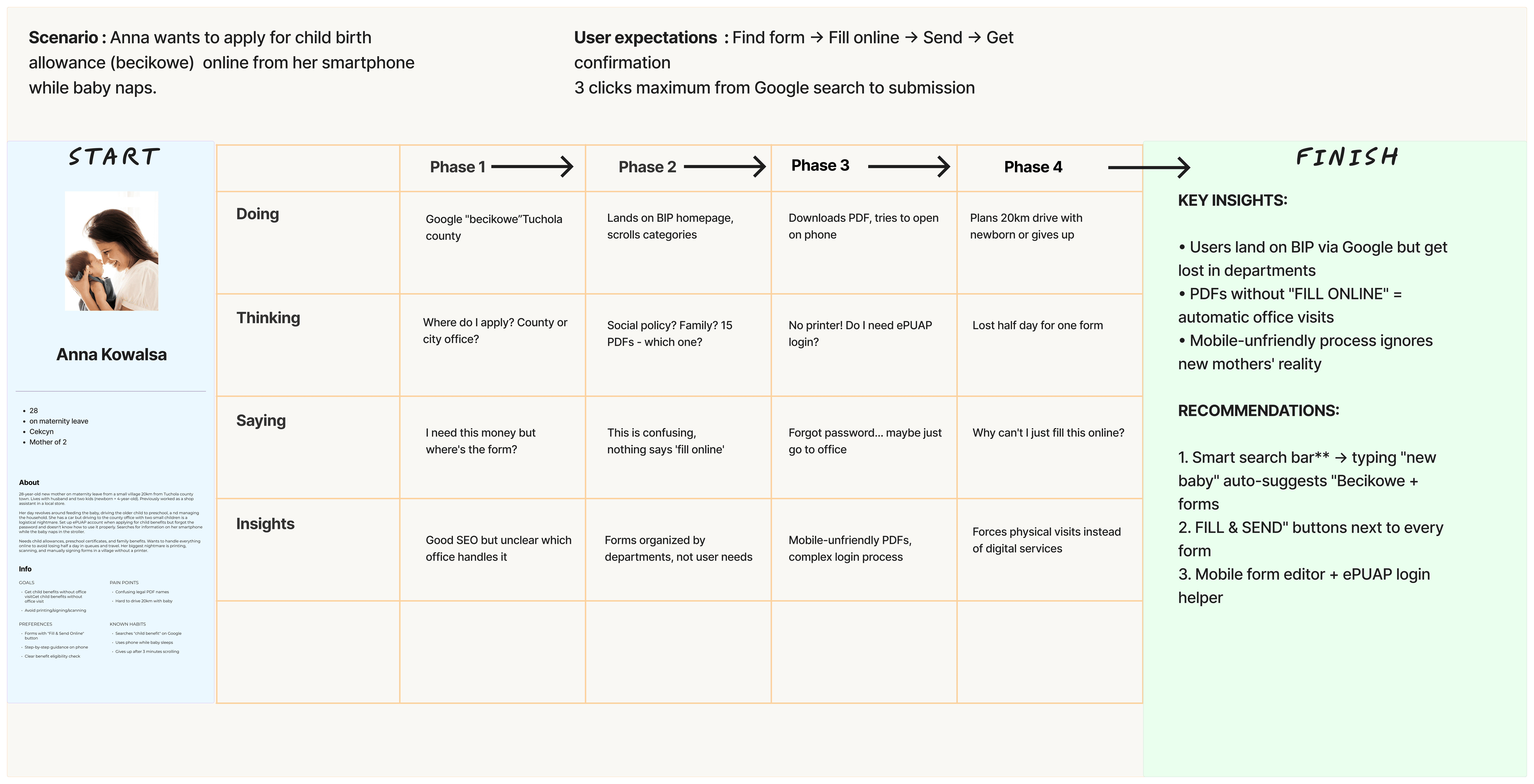
Affinity mapping helped synthesize recurring concerns raised by users, including difficulty finding information, confusion around forms, preference for online handling of government tasks, and frustration with the effectiveness of the current website. These clusters made it clear that users did not need more content — they needed clearer access, better grouping, and a more usable path to essential service.
Personas
The personas translated those findings into concrete user types with different contexts, goals, and frustrations, from residents handling family-related administrative tasks to business owners managing tenders and office workers submitting local issues. This helped ground the redesign in realistic user needs and showed that trust, clarity, and speed mattered across very different audiences.

Click to view full-size
Click to view full-size
Competitive Analysis
A comparative review of GOV.UK, eesti.ee, and nasa.gov showed how strong public-sector and content-heavy websites use hierarchy, categorization, and navigation patterns to reduce friction without overwhelming users. Compared with these references, BIP Tuchola stood out as legally informative but weak in mobile usability, scanability, and content clarity, which reinforced the need for clearer structure and more accessible pathways.
Brand Style Tile
For BIP Tuchola, I developed a modular UI kit that established a consistent design language for a public administration platform. The system combined structured typography, clear action states, and accessible interface components to improve readability, support user confidence, and make key civic services easier to understand and use.

Exploration
Before settling on the final direction, the redesign explored how government content could be structured in a way that felt simpler without losing credibility. Early thinking focused on how to reduce visual noise, make sections easier to scan, and help users choose between search and category-based browsing.
This phase showed that the biggest opportunity was not adding more interface elements, but removing friction from the existing experience. Cleaner grouping, clearer content blocks, and stronger hierarchy became the foundation of the redesign.

Design Directions
Together, the research artifacts made the opportunity clear: the site needed to feel less like a dense archive and more like a usable public service. The design direction therefore focused on clarity, trust, accessibility, and faster orientation, with an emphasis on helping users reach essential information with less effort.

Prioritization & Information Architecture
To make the experience more structured and actionable, the redesign reorganized the content into a clearer information hierarchy and more predictable navigation model. The goal was to support the way users actually approach public information websites: arriving with a task, scanning quickly, and looking for the fastest reliable path to completion.
Primary actions and high-value information were given stronger visibility, while secondary and supporting content was organized in a way that reduced noise without removing depth. This made the interface easier to understand at a glance and easier to use across desktop and mobile contexts.
To validate this structure with real user input, the new hierarchy was tested through a card sorting exercise, which confirmed how users naturally grouped and prioritized municipal content.
Card Sorting Results
The card sorting results showed that users grouped content primarily around tasks and life situations rather than internal government categories, reinforcing the decision to prioritize task-based navigation over administrative structure. These findings directly validated the simplified hierarchy and confirmed which categories needed the most visibility on the redesigned site.
User Experience (UX) Design
The experience was designed around usability principles that matter most in service-heavy public interfaces: fast orientation, minimal cognitive load, and clear progression through tasks. Search, category browsing, and form interactions were treated as core user behaviors rather than secondary features.
The redesign also focused on accessibility and responsive behavior. Stronger hierarchy, simpler layouts, clearer labels, and more readable structure made the experience more inclusive and easier to use across different devices and user confidence levels.

Wireframe Evolution
The redesign was explored through a series of wireframes to test how structure, hierarchy, and spacing could work before final styling was introduced. This helped focus on the logic of the experience first and allowed early decisions about grouping, layout, and navigation to be validated before moving into high-fidelity design.
The wireframe phase made it easier to simplify the experience intentionally. By working at a lower level of fidelity, the project could prioritize clarity and task completion instead of getting distracted by visual polish too early.


Click to view full-size
Click to view full-size
Usability Testing
The redesign was validated through two rounds of usability testing: an early lo-fi review and a later high-fidelity evaluation. Across both rounds, participant feedback confirmed that the revised structure was moving in the right direction while also revealing important gaps in forms, hierarchy, and mobile usability.
Testing showed that users relied on two different navigation behaviors: some looked for search immediately, while others preferred browsing category tiles first. The sessions also exposed missing form details, such as the IBAN field, clearer document instructions, and more user-friendly authentication options.
The high-fidelity round then confirmed the value of later iterations. Stronger hierarchy, better mobile responsiveness, and auto-fill from GovID improved the flow, while issues such as small text and low contrast led to further accessibility refinements.
Final Design
The final redesign presents the content in a cleaner, more balanced, and more service-oriented way. The hierarchy is stronger, the page is easier to scan, and the interface feels more appropriate for a public information website.
The visual language remains restrained so the content can stay central. Instead of relying on decoration, the final design improves trust, readability, and efficiency through structure, spacing, and clearer interaction patterns.
Site Map
The site map for BIP Tuchola was created from the card sorting results to build a clear information architecture. It helped organize public content into a logical structure, making key services easier to find and navigate.
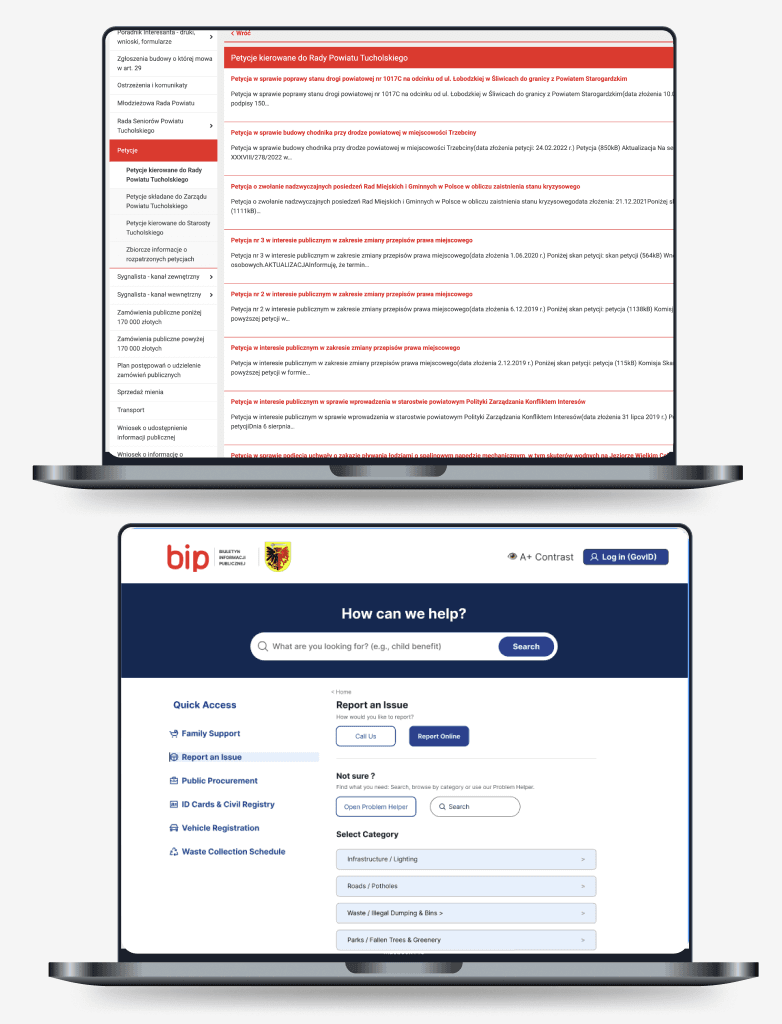
Before and After
The strongest improvement in this project was not decorative — it was structural. The redesign makes information easier to understand, the layout easier to follow, and the overall experience more usable.
This comparison is important because it shows that the value of the redesign came from simplification rather than visual polish alone. The project demonstrates how a clearer hierarchy and a better-organized flow can significantly improve a public service experience.
Outcome
The most important outcome of this project was proving that the biggest usability gains came from structural simplification. In the first round of testing, only 60 percent of participants could locate a specific piece of municipal information within two minutes; after the redesign, task completion rose to 90 percent, with average time-on-task dropping from roughly 3.5 minutes to 1.2 minutes. Estimated System Usability Scale (SUS) scores improved from a “below average” range of 58 in the initial evaluation to 76 after the second round, moving the experience from a C-grade to a solid B+ on standard usability benchmarks.
Clearer navigation, stronger hierarchy, improved forms, and a more responsive layout all contributed to a more effective and more trustworthy public-facing experience. The redesign shows that government websites do not need to feel modern by being visually loud — they become more useful when they are easier to understand, easier to scan, and better aligned with the real tasks people come to complete.
Reflection
This project reinforced an important lesson: for public information websites, clarity is the design. When content is dense and highly functional, the role of the designer is to reduce friction, support trust, and help users find what they need quickly.
BIP Tuchola also strengthened systems thinking across content, hierarchy, and interaction design. It showed how much usability can improve through better structure and prioritization, even before adding more advanced visual detail.

Redesigning a Government Information Portal
A redesign of a government information portal that transforms a dense, hard-to-navigate website into a clearer, more structured, and more trustworthy public experience.
Role: UX / UI Design
Scope: End-to-end redesign of a public government information website, focused on information architecture, navigation, visual hierarchy, usability testing, and final UI design.
Goal: Simplify a dense municipal website into a clear, well-structured experience that helps users find important information quickly without losing credibility or purpose.
Outcome: Two rounds of usability testing revealed the need for stronger hierarchy, better mobile responsiveness, clearer forms, and improved accessibility, leading to a redesign with more prominent search, a streamlined step-by-step flow, and a single-column responsive layout.
Overview
BIP Tuchola is a redesign of a public information website created to improve access to municipal content. The project focused on making the experience easier to scan, easier to navigate, and more supportive of task-based use, especially for people who visit the site to complete a specific action quickly.
Rather than treating the redesign as a visual refresh, the work focused on structure, hierarchy, and trust. The goal was to create a calmer and more predictable experience while preserving the seriousness and credibility expected from a government service.
The Problem
The original website contained useful information, but the experience did not support quick access to it. Important content was harder to find than it should have been, and the page hierarchy did not clearly guide users through the interface.
For a public information website, that creates friction very quickly. People usually arrive with a specific task in mind, so the interface needs to help them orient themselves fast and move efficiently through the content.

Click to view full-size
Research
To understand where the problems were coming from, the redesign began with a review of the existing site structure and its main usability issues. The analysis focused on how content was grouped, how navigation either supported or slowed down the experience, and where the visual hierarchy made scanning harder than necessary.
The audit showed that the site needed stronger structure, clearer grouping, and more deliberate prioritization. Instead of making the interface more decorative, the direction focused on making it easier to read, easier to navigate, and more predictable.
Affinity Mapping
Affinity mapping helped synthesize recurring concerns raised by users, including difficulty finding information, confusion around forms, preference for online handling of government tasks, and frustration with the effectiveness of the current website. These clusters made it clear that users did not need more content — they needed clearer access, better grouping, and a more usable path to essential service.
Personas
The personas translated those findings into concrete user types with different contexts, goals, and frustrations, from residents handling family-related administrative tasks to business owners managing tenders and office workers submitting local issues. This helped ground the redesign in realistic user needs and showed that trust, clarity, and speed mattered across very different audiences.

Click to view full-size

Competitive Analysis
A comparative review of GOV.UK, eesti.ee, and nasa.gov showed how strong public-sector and content-heavy websites use hierarchy, categorization, and navigation patterns to reduce friction without overwhelming users. Compared with these references, BIP Tuchola stood out as legally informative but weak in mobile usability, scanability, and content clarity, which reinforced the need for clearer structure and more accessible pathways.
Click to view full-size
Brand Style Tile
For BIP Tuchola, I developed a modular UI kit that established a consistent design language for a public administration platform. The system combined structured typography, clear action states, and accessible interface components to improve readability, support user confidence, and make key civic services easier to understand and use.
Exploration
Before settling on the final direction, the redesign explored how government content could be structured in a way that felt simpler without losing credibility. Early thinking focused on how to reduce visual noise, make sections easier to scan, and help users choose between search and category-based browsing.
This phase showed that the biggest opportunity was not adding more interface elements, but removing friction from the existing experience. Cleaner grouping, clearer content blocks, and stronger hierarchy became the foundation of the redesign.
Click to view full-size
Design Direction
Together, the research artifacts made the opportunity clear: the site needed to feel less like a dense archive and more like a usable public service. The design direction therefore focused on clarity, trust, accessibility, and faster orientation, with an emphasis on helping users reach essential information with less effort.
Prioritization & Information Architecture
To make the experience more structured and actionable, the redesign reorganized the content into a clearer information hierarchy and more predictable navigation model. The goal was to support the way users actually approach public information websites: arriving with a task, scanning quickly, and looking for the fastest reliable path to completion.
Primary actions and high-value information were given stronger visibility, while secondary and supporting content was organized in a way that reduced noise without removing depth. This made the interface easier to understand at a glance and easier to use across desktop and mobile contexts.
To validate this structure with real user input, the new hierarchy was tested through a card sorting exercise, which confirmed how users naturally grouped and prioritized municipal content.
Card Sorting Results
The card sorting results showed that users grouped content primarily around tasks and life situations rather than internal government categories, reinforcing the decision to prioritize task-based navigation over administrative structure. These findings directly validated the simplified hierarchy and confirmed which categories needed the most visibility on the redesigned site.
Site Map
The site map for BIP Tuchola was created from the card sorting results to build a clear information architecture. It helped organize public content into a logical structure, making key services easier to find and navigate.

Click to view full-size
User Experience (UX) Design
The experience was designed around usability principles that matter most in service-heavy public interfaces: fast orientation, minimal cognitive load, and clear progression through tasks. Search, category browsing, and form interactions were treated as core user behaviors rather than secondary features.
The redesign also focused on accessibility and responsive behavior. Stronger hierarchy, simpler layouts, clearer labels, and more readable structure made the experience more inclusive and easier to use across different devices and user confidence levels.
Wireframe Evolution
The redesign was explored through a series of wireframes to test how structure, hierarchy, and spacing could work before final styling was introduced. This helped focus on the logic of the experience first and allowed early decisions about grouping, layout, and navigation to be validated before moving into high-fidelity design.
The wireframe phase made it easier to simplify the experience intentionally. By working at a lower level of fidelity, the project could prioritize clarity and task completion instead of getting distracted by visual polish too early.
Click to view full-size
Usability Testing
The redesign was validated through two rounds of usability testing: an early lo-fi review and a later high-fidelity evaluation. Across both rounds, participant feedback confirmed that the revised structure was moving in the right direction while also revealing important gaps in forms, hierarchy, and mobile usability.
Testing showed that users relied on two different navigation behaviors: some looked for search immediately, while others preferred browsing category tiles first. The sessions also exposed missing form details, such as the IBAN field, clearer document instructions, and more user-friendly authentication options.
The high-fidelity round then confirmed the value of later iterations. Stronger hierarchy, better mobile responsiveness, and auto-fill from GovID improved the flow, while issues such as small text and low contrast led to further accessibility refinements.
Final Design
The final redesign presents the content in a cleaner, more balanced, and more service-oriented way. The hierarchy is stronger, the page is easier to scan, and the interface feels more appropriate for a public information website.
The visual language remains restrained so the content can stay central. Instead of relying on decoration, the final design improves trust, readability, and efficiency through structure, spacing, and clearer interaction patterns.
View figma prototype
Before and After
The strongest improvement in this project was not decorative — it was structural. The redesign makes information easier to understand, the layout easier to follow, and the overall experience more usable.
This comparison is important because it shows that the value of the redesign came from simplification rather than visual polish alone. The project demonstrates how a clearer hierarchy and a better-organized flow can significantly improve a public service experience.
Outcome
The most important outcome of this project was proving that the biggest usability gains came from structural simplification. In the first round of testing, only 60 percent of participants could locate a specific piece of municipal information within two minutes; after the redesign, task completion rose to 90 percent, with average time-on-task dropping from roughly 3.5 minutes to 1.2 minutes. Estimated System Usability Scale (SUS) scores improved from a “below average” range of 58 in the initial evaluation to 76 after the second round, moving the experience from a C-grade to a solid B+ on standard usability benchmarks.
Clearer navigation, stronger hierarchy, improved forms, and a more responsive layout all contributed to a more effective and more trustworthy public-facing experience. The redesign shows that government websites do not need to feel modern by being visually loud — they become more useful when they are easier to understand, easier to scan, and better aligned with the real tasks people come to complete.
Reflection
This project reinforced an important lesson: for public information websites, clarity is the design. When content is dense and highly functional, the role of the designer is to reduce friction, support trust, and help users find what they need quickly.
BIP Tuchola also strengthened systems thinking across content, hierarchy, and interaction design. It showed how much usability can improve through better structure and prioritization, even before adding more advanced visual detail.
Outcome
most important outcome of this project was proving that the biggest usability gains came from structural simplification. Clearer navigation, stronger hierarchy, improved forms, and a more responsive layout all contributed to a more effective and more trustworthy public-facing experience.
The redesign shows that government websites do not need to feel modern by being visually loud. They become more useful when they are easier to understand, easier to scan, and better aligned with the real tasks people come to complete.
View figma prototype
Reflection
This project reinforced an important lesson: for public information websites, clarity is the design. When content is dense and highly functional, the role of the designer is to reduce friction, support trust, and help users find what they need quickly.
BIP Tuchola also strengthened systems thinking across content, hierarchy, and interaction design. It showed how much usability can improve through better structure and prioritization, even before adding more advanced visual detail.